


Description
Download Headline – compact RSS reader, video player, secure feed manager
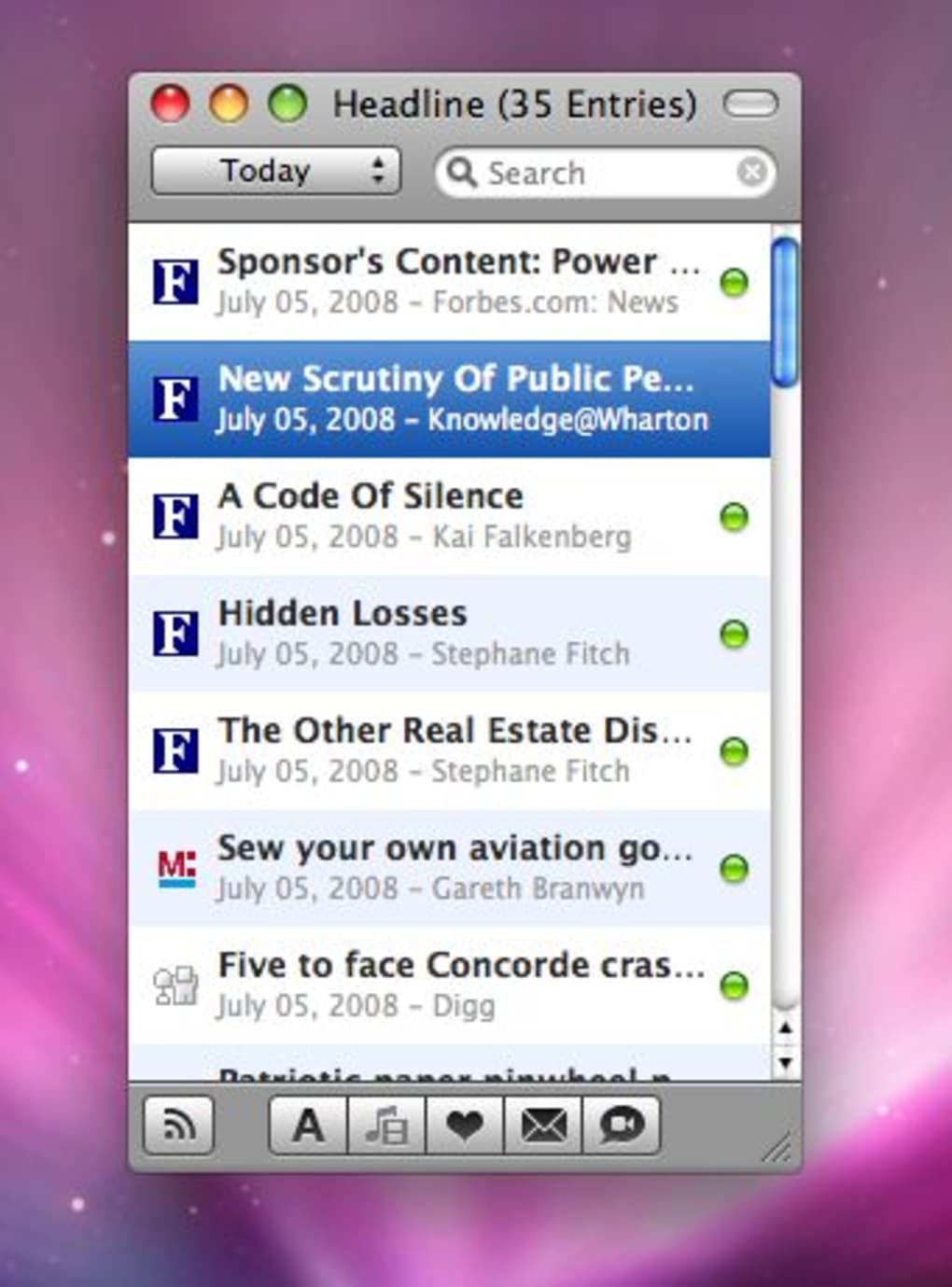
Headline is a pocket‑sized desktop RSS news reader that feels more like a chat client than a traditional feed aggregator. Designed for users who want a fast, lightweight interface without sacrificing essential features, Headline delivers a streamlined experience on Windows, macOS, and Linux (via Wine). The application ships with a curated collection of popular feeds, yet it gives you full control to add, edit, or delete any source you prefer. When you click on an article, a Quick Look‑style preview window appears, keeping the main list clean and allowing you to skim content instantly. The built‑in video player lets you watch embedded videos or listen to audio podcasts directly within the preview pane—no need to open a separate browser tab. A responsive search box at the top of the window makes finding specific headlines a breeze, while a handy toggle button at the bottom left lets you flip between the feed list and the article list in a single click. Favorite items can be marked for later reading and shared through email or iChat with just a few keystrokes. Although Headline sacrifices a full‑browser view to stay compact, its unique UI and media capabilities make it an attractive alternative for power users who value speed, simplicity, and a touch of visual flair.
Key Features & Compatibility
- Chat‑style interface that keeps your feed list clean and easy to navigate.
- Quick Look preview window that pops up instantly, eliminating the need for scrolling.
- Integrated video and audio player—watch YouTube clips, listen to podcasts, and view media without leaving the app.
- Responsive top‑bar search box that filters items in real‑time as you type.
- One‑click toggle button for switching between feed overview and article list.
- Favorites system to bookmark articles for later reading.
- Sharing options via email and iChat, with automatic link formatting.
- Pre‑installed collection of popular feeds, plus unlimited custom feed support.
- Lightweight footprint—runs smoothly on older hardware and low‑end laptops.
- Secure handling of RSS URLs with automatic HTTPS fallback when available.
Compatibility: Windows 10+, macOS 10.12+, Linux (via Wine). The application is built with cross‑platform libraries, ensuring a consistent look and feel across all supported operating systems. Whether you are on a Windows workstation, a MacBook, or a Linux machine, Headline installs with a single click and requires no additional runtime components.
Installation, Usage & Real‑World Pros / Cons
Installing Headline is straightforward. Visit the official website, click the “Download for Windows/macOS/Linux” button, and the installer will guide you through a typical wizard‑style setup. The Windows version uses a standard .exe installer, the macOS version provides a drag‑and‑drop .dmg package, and the Linux version offers a .tar.gz archive that can be extracted and launched directly or installed via a provided .deb package for Debian‑based distributions. After installation, launch Headline from your desktop or start menu. On first run, the app presents a welcome screen that lets you import the default feed collection or start with a blank slate.
Adding new feeds is as easy as copying a URL into the “Add Feed” dialog, which validates the RSS/Atom format before confirming the addition. You can organize feeds into custom categories, hide those you rarely read, and reorder them with drag‑and‑drop. The search bar at the top instantly filters both feed titles and article headlines, making it simple to locate a specific story among hundreds of items.
When you click an article, the Quick Look preview slides into view, displaying the article’s text, images, and any embedded media. If the entry contains a video or audio file, the built‑in player appears at the bottom of the preview, complete with play, pause, and volume controls. This eliminates the need to open a browser tab or external media player, saving both time and system resources.
Below is a quick snapshot of the real‑world advantages and drawbacks users commonly experience with Headline:
- Pros
- Fast, lightweight UI that launches instantly on older hardware.
- Integrated media playback removes the need for external browsers.
- Chat‑style layout keeps the interface uncluttered and modern.
- Responsive search filters results in milliseconds.
- Easy feed management with drag‑and‑drop categorisation.
- Secure handling of feed URLs with automatic HTTPS fallback.
- Cons
- No built‑in full‑browser view for complex web pages.
- Linux support relies on Wine, which may require additional configuration.
- Limited customization of UI themes beyond the default dark/light mode.
- Sharing options are limited to email and iChat; no direct social media integration.
Frequently Asked Questions
Is Headline completely free or does it have a paid version?
Headline is offered as a free download with all core features included. There is no premium tier, and the developer does not display ads within the application.
Can I import my existing RSS subscriptions from another reader?
Yes. Headline supports OPML import, allowing you to transfer feeds from most popular readers such as Feedly, Inoreader, or Thunderbird with a single click.
Does Headline store my data locally or in the cloud?
All feed data, read/unread status, and favorites are stored locally on your device. No cloud synchronization is performed unless you manually export your OPML file.
How does the built‑in video player handle DRM‑protected streams?
The player uses the system’s native media framework, which can play most standard streaming formats. DRM‑protected streams that require a browser plug‑in are not supported and will fall back to opening in your default web browser.
Is there a way to customize keyboard shortcuts?
Headline includes a limited set of default shortcuts (e.g., ⌘+F for search, Ctrl+R to refresh feeds). At the moment the application does not offer a shortcut‑customization panel, but the developer has indicated that this feature may be added in future updates.
Conclusion & Call to Action
Overall, Headline delivers a fresh take on desktop RSS consumption by marrying a chat‑style UI with fast search, built‑in media playback, and straightforward feed management. Its lightweight footprint makes it ideal for users who want a responsive reader without the bloat of full‑browser integrations. While the lack of a native full‑web view and limited theme options may deter power users who crave deep customization, the trade‑off results in a cleaner, faster experience that keeps you focused on the content that matters. If you’re looking for a free, secure, and easy‑to‑use RSS client that handles video and audio gracefully, Headline is definitely worth a try. Download it today, add your favorite feeds, and enjoy a smoother news‑reading workflow across Windows, macOS, and Linux.
Guides & Tutorials for Headline
How to install Headline
- Click the Preview / Download button above.
- Once redirected, accept the terms and click Install.
- Wait for the Headline download to finish on your device.
How to use Headline
This software is primarily used for its core features described above. Open the app after installation to explore its capabilities.
User Reviews for Headline 0
No reviews found





.webp)